KeyCadence
KeyCadence repeats mouse and keyboard input on a Windows PC.
Download the free version Buy Pro, $19.00
- Version
- 2.3.0
- Runs on
- 64-bit Windows 11. Windows 10 has not been tested yet.
- Download
- A 25 MB zip. There is no installer.
- Pro
- $29.99, paid once. One key covers up to 3 of your own PCs.
- Launch price
- $19.00 until November 7, 2026, then $29.99
- Refunds
- 7 days; 14 days for EU and UK customers
What it does
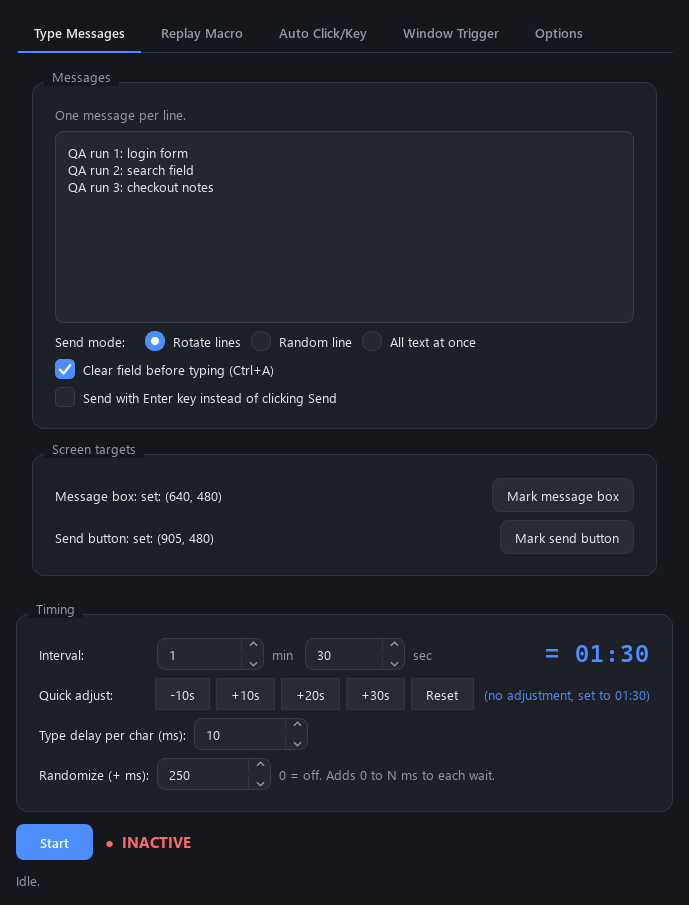
Record a macro of your mouse movement, clicks, scrolling and keystrokes, then replay it on a timer. Type lines of text into a field on a schedule, one line per send or the whole box at once. Run an auto-clicker or key-presser at a set rate in milliseconds.
F8 starts and stops it from any window, except programs running as administrator, which KeyCadence can't control. While KeyCadence controls your input, a see-through warning covers the screen your mouse is on and shows the stop key. It is on by default and you can turn it off.
Replay uses the exact screen positions you recorded, so keep the target window in the same place.
Free and Pro
Try the free version first. It is the same download, and a Pro key unlocks it in place.
Pro removes the Free limits:
- Scheduled typing: Free allows 10 sends per 6 hours.
- Macros: Free saves 1 macro and allows 10 starts per 24 hours. Each start loops until you stop it.
Pro also adds:
- Window trigger: start the selected macro when a window whose title contains text you choose is focused, maximized or open.
- Random extra delay: adds 0 to N ms (up to 5,000) to each wait between runs and between auto-clicks.
The auto-clicker, key-presser, hotkeys, dark and light mode and warning overlay have no limits in either version.
Install and activate
You get a license key and the Windows download, a 25 MB zip for 64-bit Windows 11 (Windows 10 has not been tested yet). There is no installer. Unzip it and run KeyCadence.exe, keeping the _internal folder next to it.
Paste the key into Options > License and click Activate. One key covers up to 3 of your own PCs. After activation Pro works offline. When the PC is online, KeyCadence re-checks the key with Gumroad about every 14 days. Those license checks are the only thing the app sends over the network.
Windows security warnings
KeyCadence is not code-signed yet. SmartScreen may warn the first time you run it: click More info, then Run anyway. If Smart App Control is on in Windows Security, Windows blocks unsigned apps and has no Run anyway option, so check with the free version before you buy.
Refunds
Full refund within 7 days of purchase, or 14 days for EU and UK customers. Email support@kilotonlabs.com or reply to your Gumroad receipt, and include the email you bought with. A refunded key stops working the next time KeyCadence checks it with Gumroad.
The EULA, privacy policy and open-source notices are in the zip. The EULA and privacy policy are also on this site.