Foyer
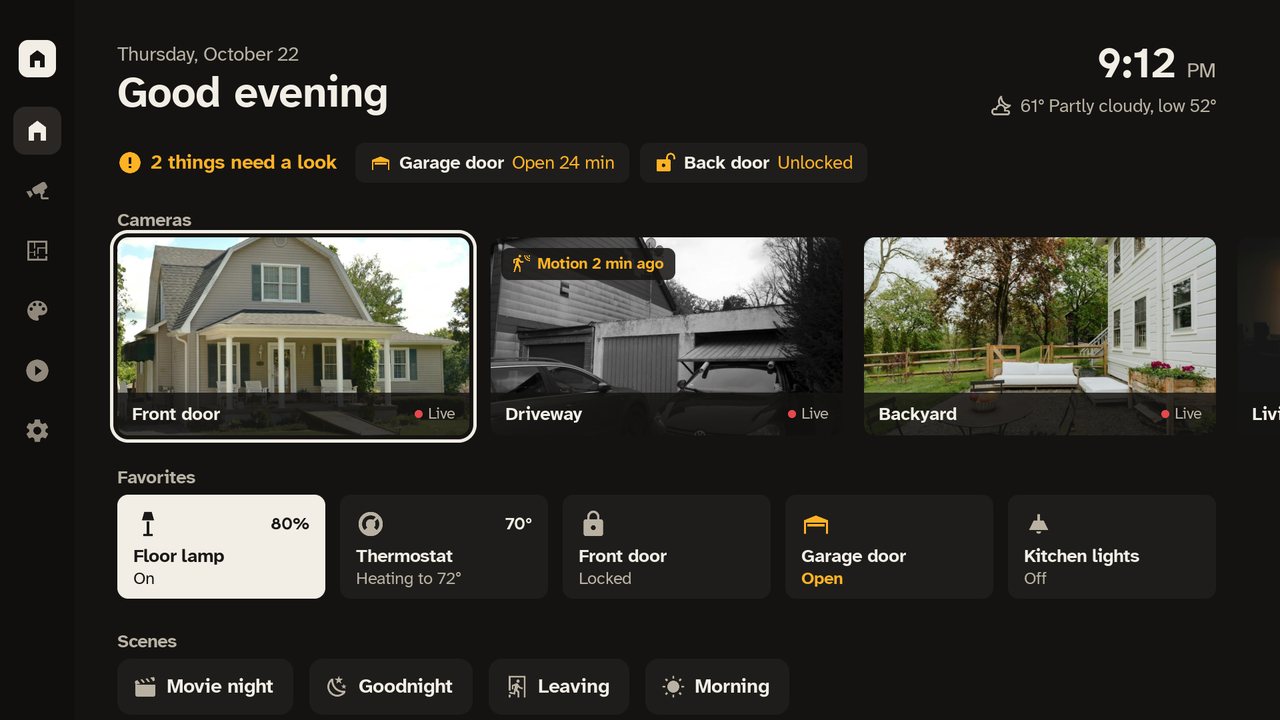
Foyer is a Home Assistant dashboard for Roku TVs and streaming players: your cameras, rooms and devices on the big screen, controlled with the remote.
- Runs on
- Roku TVs and streaming players
- Needs
- Your own Home Assistant server and the free Foyer integration
- Integration
- kilotonlabs/foyer-ha on GitHub, GPL-3.0
- Version
- 1.0
What it does
- See every camera at once in a grid, then open one full screen with live video and the lights and locks in the same room.
- When the doorbell rings, a Home Assistant automation can bring the TV to the front door camera with the buttons you choose, then hand the TV back to what was playing.
- Control lights, thermostats, fans, blinds, garage doors, locks and media players. Unlocking a door or opening a garage door needs OK held for a second.
- Rooms come from your Home Assistant areas. Scenes and scripts run with one press.
- Notifications from Home Assistant appear in a corner of the screen, with a camera picture if you name one.
- Browse and play the videos, music and pictures in Home Assistant's My media, with resume, audio and subtitle choices, and files the Roku can't open repackaged as they play.
- Cast media, camera views and dashboard views from Home Assistant.
- Try the built-in demo home without a server.
What you need
- Your own Home Assistant server, with permission to install a custom integration.
- The free Foyer integration for Home Assistant, installed with HACS or by hand.
- A Roku device on a network that can reach your Home Assistant server.
- For casting dashboards only: the optional Foyer renderer, which runs on your own equipment.
Get started
- In Home Assistant, install the Foyer integration: in HACS, open the menu in the top right corner, choose Custom repositories, add
https://github.com/kilotonlabs/foyer-hawith the type Integration, download Foyer and restart Home Assistant. To install it without HACS, follow the integration's instructions. - Install Foyer on your Roku and open it once.
- In Home Assistant, go to Settings > Devices & services. Your TV shows up as a discovered device. Choose what the TV shows, then confirm on the TV that it shows the same number as Home Assistant.
If the TV is not discovered, add Foyer by hand in Devices & services, then on the TV choose Connect and enter your Home Assistant address and the eight-digit code Home Assistant shows.
Foyer runs while it is open. Roku apps cannot draw over other apps; a doorbell alert or cast opens Foyer, which interrupts what is playing, if your Roku allows network control. Roku's screensaver still appears after your TV's idle time. Foyer is not an alarm or emergency monitoring service.
Foyer is published by Kiloton Labs. It is an independent app and is not affiliated with or endorsed by Roku, Inc., Home Assistant or the Open Home Foundation. Roku is a trademark of Roku, Inc. Home Assistant is a trademark of its owners.